有朋友的Mac Air上面遇到無法開啟Diable 3 的問題,每次開啟一直出現要輸入使用著帳號密碼的提示,顯示說
Agent要更新,但輸入後卻什麼反應也沒有,也嘗試使用了硬碟權限修復所有權限上面的問題,但問題還是沒解
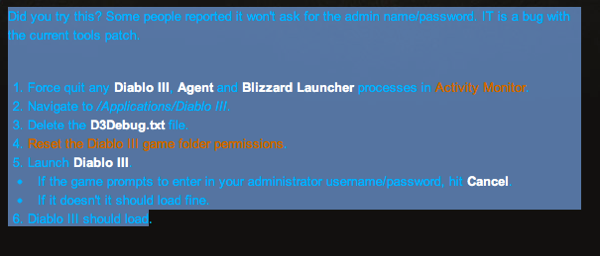
後來終於在Blizzard 上面的官方網站上找到解法,原來是他們的問題,解法就是把所有的Agent, Diable III , Blizzard
Launcher都關掉後,詳細步驟如下,很簡單,照做後,問題果然就好了
原始出處:
有朋友的Mac Air上面遇到無法開啟Diable 3 的問題,每次開啟一直出現要輸入使用著帳號密碼的提示,顯示說
Agent要更新,但輸入後卻什麼反應也沒有,也嘗試使用了硬碟權限修復所有權限上面的問題,但問題還是沒解
後來終於在Blizzard 上面的官方網站上找到解法,原來是他們的問題,解法就是把所有的Agent, Diable III , Blizzard
Launcher都關掉後,詳細步驟如下,很簡單,照做後,問題果然就好了
原始出處:
Copyright (c) Microsoft Corporation. All rights reserved.


Loading Dump File [E:\Temp\Rar$DI00.688\050510-40794-01.dmp]
Mini Kernel Dump File: Only registers and stack trace are available

Symbol search path is: SRV*C:\SymCache*http://msdl.microsoft.com/download/symbols
Executable search path is:
Windows 7 Kernel Version 7600 MP (2 procs) Free x86 compatible
Product: WinNt, suite: TerminalServer SingleUserTS
Built by: 7600.16539.x86fre.win7_gdr.100226-1909
Machine Name:
Kernel base = 0x8300b000 PsLoadedModuleList = 0x8314a570
Debug session time: Tue May  4 17:46:53.374 2010 (GMT-4)
System Uptime: 0 days 0:34:44.887
Loading Kernel Symbols
...............................................................
................................................................
....................................................
Loading User Symbols
Loading unloaded module list
.........
*******************************************************************************
*                                                                             *
*                        Bugcheck Analysis                                    *
*                                                                             *
*******************************************************************************

Use !analyze -v to get detailed debugging information.

BugCheck 100000B8, {85fbc020, 83136240, 8df6ffd0, 0}

*** WARNING: Unable to verify timestamp for snapman.sys
*** ERROR: Module load completed but symbols could not be loaded for snapman.sys
Probably caused by : snapman.sys ( snapman+fd6b )

Followup: MachineOwner
---------

0: kd> !analyze -v
*******************************************************************************
*                                                                             *
*                        Bugcheck Analysis                                    *
*                                                                             *
*******************************************************************************

ATTEMPTED_SWITCH_FROM_DPC (b8)
A wait operation, attach process, or yield was attempted from a DPC routine.
This is an illegal operation and the stack track will lead to the offending
code and original DPC routine.
Arguments:
Arg1: 85fbc020, Original thread which is the cause of the failure
Arg2: 83136240, New thread
Arg3: 8df6ffd0, Stack address of the original thread
Arg4: 00000000

Debugging Details:
------------------


FAULTING_THREAD:  85fbc020

CUSTOMER_CRASH_COUNT:  1

DEFAULT_BUCKET_ID:  VISTA_DRIVER_FAULT

BUGCHECK_STR:  0xB8

PROCESS_NAME:  SYSTEM

CURRENT_IRQL:  2

LAST_CONTROL_TRANSFER:  from 83066c6d to 8305fde6

STACK_TEXT:
80d8ab48 83066c6d 85fbc020 00000000 8312cd20 nt!KiSwapContext+0x26
80d8ab80 83065ad3 85fbc0e0 85fbc020 85f9ec10 nt!KiSwapThread+0x266
80d8aba8 8305f74f 85fbc020 85fbc0e0 00000000 nt!KiCommitThreadWait+0x1df
80d8ac24 89758d6b 85f9ec10 00000000 00000000 nt!KeWaitForSingleObject+0x393
WARNING: Stack unwind information not available. Following frames may be wrong.
80d8ac90 83039f44 85fbac48 8622dbb0 8622ddf4 snapman+0xfd6b
80d8aca8 89636bed 00004000 8622de20 86227000 nt!IofCallDriver+0x63
80d8acbc 896440f7 8622dbb0 85fbac48 00000004 volsnap!VspAsynchronousIo+0x10f
80d8ad08 896442e8 8622d0f4 8622d0e8 00000000 volsnap!VspWriteTableUpdates+0x27d
80d8ad38 8964440e 00779cb8 85fbb0d8 872e3eb0 volsnap!VspWriteVolumePhase32+0x12c
80d8ad54 89636ac4 00000000 85814658 00000000 volsnap!VspWriteVolumePhase3+0xc0
80d8ad74 83060fa0 00000000 85814658 872e3eb0 volsnap!VspPerformanceWrapperCompletionRoutine+0x3c
80d8adb8 8938a498 80d8adec 8938aabd 85fa5030 nt!IopfCompleteRequest+0x115
80d8adc0 8938aabd 85fa5030 85814658 00000001 CLASSPNP!ClassCompleteRequest+0x11
80d8adec 83060fa0 00000000 87c2edf8 01c2ef00 CLASSPNP!TransferPktComplete+0x2e4
80d8ae30 88f9dd97 87c2efac 858ad460 80d8ae60 nt!IopfCompleteRequest+0x115
80d8ae40 88f9e636 84f4a6c8 87c2edf8 87c2efac ataport!IdeCompleteScsiIrp+0x31
80d8ae60 88f9b4bd 84f4a6c8 858ad460 84f4c0e0 ataport!IdeCommonCrbCompletion+0x44
80d8ae7c 88fa1468 84f4c0e0 858ad460 858ad460 ataport!IdeTranslateCompletedRequest+0x161
80d8aef4 88fa166b 84f4c0e0 858ad460 84f4c09c ataport!IdeProcessCompletedRequests+0x2a0
80d8af48 83060835 84f4c09c 84f4c028 00000000 ataport!IdePortCompletionDpc+0xab
80d8afa4 83060698 8312cd20 85fbc020 00000000 nt!KiExecuteAllDpcs+0xf9
80d8aff4 8305fe5c 8df6fab8 00000000 00000000 nt!KiRetireDpcList+0xd5
80d8aff8 8df6fab8 00000000 00000000 00000000 nt!KiDispatchInterrupt+0x2c
8305fe5c 00000000 0000001a 00d6850f bb830000 0x8df6fab8


STACK_COMMAND:  .thread 0xffffffff85fbc020 ; kb

FOLLOWUP_IP:
snapman+fd6b
89758d6b ??              ???

SYMBOL_STACK_INDEX:  4

SYMBOL_NAME:  snapman+fd6b

FOLLOWUP_NAME:  MachineOwner

MODULE_NAME: snapman

IMAGE_NAME:  snapman.sys

DEBUG_FLR_IMAGE_TIMESTAMP:  45265dbe

FAILURE_BUCKET_ID:  0xB8_snapman+fd6b

BUCKET_ID:  0xB8_snapman+fd6b

Followup: MachineOwner
---------
So, please completely uninstall your Acronis True Image which is causing you the grief.
1./etc/resolve.conf 增加 domain XXX.XXXX
2.啟動 service nscd restart ( name device cache deamon)
1. Install Xcode From the App Store.
2. In preferences the Xcode, select tab Downloads, and Download Command Line Tools.
最近因為看到單條8gb的ram 價格狂降,忍不住就把自己的MBP升級到16gb,看著這麼大的記憶體沒用完
就會想起ram disk,稍微找了一下,看到一個2008年的專案,radisk-sync,測試一下在最新的Mac OS 10.8
還是跑的很好,有需要的朋友可以自行到網站上去下載
disk_path> [--force]disk_path>compact |
Removes all empty blocks from the expanding virtual disk and reduces its size on your physical disk. The disk to be compacted must be formatted as NTFS, FAT 16, FAT 32, ext2, or ext3. You can also try to compact virtual disks with other filesystems using the
--buildmap option. |
--hdd <disk_path> |
Full path to the virtual disk to be configured.
|
--buildmap |
Compacts virtual disks with unsupported filesystems.
|
--force |
Forces the compacting operation for suspended virtual disks.
|
-i, --info |
Do not compact the virtual disk; just display the information about the size the disk will have after compacting.
|
