Google Keep是google 提供的一個類似simple note的服務,我使用他來記錄一些簡單的筆記內容
shift+enter :即可以強制換行
[known issue]
https://boxcryptor.desk.com/customer/portal/articles/688364-why-am-i-receiving-the-error-filexyz-is-damaged-and-can-t-be-opened-you-should-move-it-to-the-trash-%22-under-mountain-lion-
We've just released a new version of BoxCryptor for Mac OS X. In order to better handle that problem we added a "Fix 'damaged' files" feature which removes the com.apple.quarantine extended attribute from all files in the BoxCryptor Folder. To use the feature:
1) Switch to Advanced Mode
2) Right-click on the BoxCryptor Volume
3) Choose "Fix 'damaged' files"
You can download it here:
https://www.boxcryptor.com/download/BoxCryptor_Installer.dmg
-- Robert
從boxcryptor看到的,實在想不太透,為什麼private key and public 都存在local電腦,也跟zero knowledge扯的上邊
**註:寫的不錯對於interactive and zero knowledge 的證明:
http://www1.cs.columbia.edu/~zeph/4261/lectures/interactive-proofs.pdf
Q:Do you now know my keys or are you still zero knowledge? And: We never have access to your private keys or keys used to encrypt files. We still follow the zero knowledge principle. All data leaving your computer is encrypted with your password - which only you know and which never leaves your computer. This also means, that we're still not able to recover your password!
1.編輯root .profile
/private/var/root/.profile
2.add following line in .profile
-使用export command 在使用登入時設定python path變數
-在pythonpath把原本的python path (${PYTHONPATH} 帶入
-每個pathonpath使用:分隔
# Python path for WFBS-SVC library
export PYTHONPATH="${PYTHONPATH}:/opt/trendmicro/lib/python2.6/site-packages/:/volumes/MacintoshHD/Source/lib:/volumes/MacintoshHD/Source/res/lib"
# Python path
export PYTHONPATH="/opt/trendmicro/lib/python2.6/site-packages/:/volumes/MacintoshHD/Source/auto/wfbs-svc/lib:/volumes/MacintoshHD/Source/auto/wfbs-svc/res/lib"
之前在背單字,都是只有使用標準的Anki,如果遇到不會發音的單字,在配合Mac OS的快鍵鍵(三指點選),直接使用系統發聲,這樣如果是在電腦上被單字都沒太大的問題,但當使用其他的mobile device在背誦時,就會遇到無法發音的狀況,其實搭配使用Yahoo辭典也沒被法,下面推薦的這個Anki Add-on,我使用其來覺得很單純也很直覺,就像內容描述一樣,只要安裝完後,在增加單詞時,即可以使用這個add on tool去增加單字發音,經測驗,我的ipad上的Anki也可以聽到聲音
https://ankiweb.net/shared/info/301952613
1.最簡單的安裝是使用brew
#brew install goaccess
2.不過因為goaccess在三月的時候更改過檔案,但因為版本號一樣維持在0.5,所以照成brew下載完後,在做Sha1檢查時,會不過
3.所以我後來還是直接下載原始檔案安裝
4.執行指令很簡單,最簡單的指令就是
#goaccess -f access.log
5.接下來,就會出現困惱我一個多小時的問題了,就是goaccess process 要執行的指令預設是使用F10,偏偏在Mac上預設功能鍵是沒有開啟的
我有參考Apple 論壇上的建議,去設定檔->鍵盤中,把F1,F2....等等功能鍵開啟,不過一樣沒有作用,也有考慮過直接去修改原始檔案,把F10改掉,
不過後來終於讓我在無意中測試出來,重點在於fn+cmd+F10就可以模擬出原始的功能鍵
fn+cmd+F10 = F10
1.可以上網下載,為一個java檔而已
2.如果你的server有安裝java,只要直接執行即可
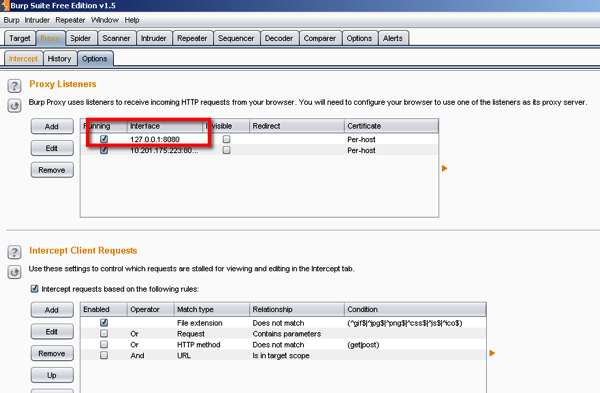
#java -jar -Xmx1024m burpsuite_free_v1.5.jar
3.跑起來後,預設會設在本機:8080,如果要當remote proxy server使用,請自己增加ip
4.到你的瀏覽器(Browser)設定所有的traffice透過此proxy,以便進行monitor
5.系統預設intercept 是開啟的,當此設定開啟時,系統每一個步驟都會等你,如果要繼續往下一步走,只要點選'Forward',如果不需要此功能,可以直接把intercept關閉即可
http://www.google.com/mobile/goggles/#text
利用,手機上的google goggles,對者數獨拍照,在進行搜索,就有機會得到答案